
戴均民
{{ blogDate }}
為某個程式加上【以系統管理員執行此程式】
終於找到在 windows 7 中替某個程式加上【以系統管理員執行此程式】的方法了!!
這樣的話,我在 Easy_run_class 中新增 PATH 應該就不會遇到什麼問題了
要新增資料到登錄檔裡面
安裝程式都可以代勞~
接下來的比較大的問題…可能就是要怎麼辦找到 JDK 的路徑了吧 (在沒有安裝在預設路徑的情況下)
本文章轉載自:http://www.sevenforums.com/tutorials/316-compatibility-mode.html
- Open the Start Menu, then type regedit in the search box and press Enter.
- If prompted by UAC, then click on Yes.
- In regedit, navigate to the location below. (see screenshot below)
HKEY_CURRENT_USER\Software\Microsoft\Windows NT\CurrentVersion\AppCompatFlags\Layers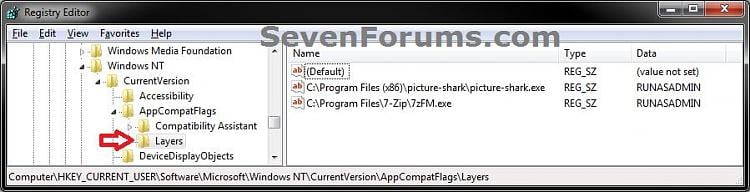
- To Run a Program in Compatibility Mode
- In the right pane of Layers, right click on a empty area and click on New, then onString Value. (see screenshot below)
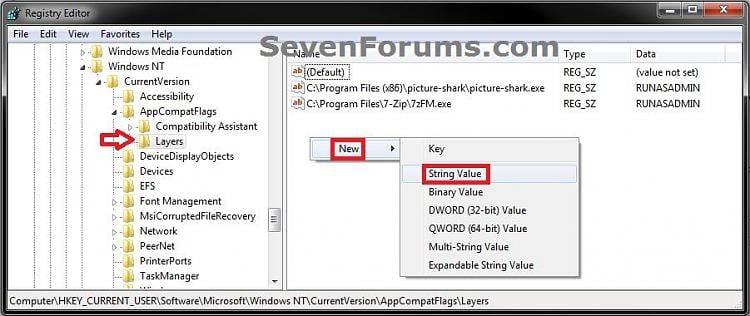
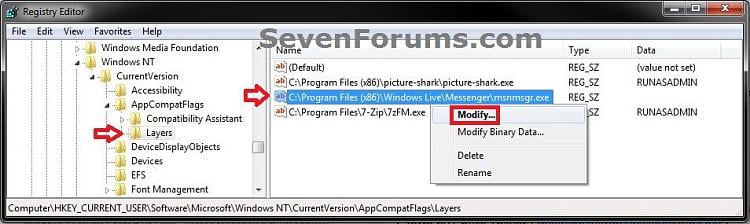
- Type in the full path of the program’s exe file and press Enter, then right click on the full path and click on Modify. (see screenshot below)
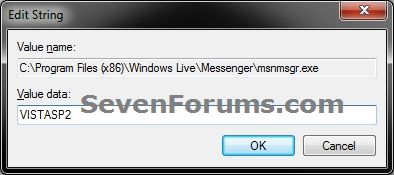
- Type in a single or combination of Data values (see tables below) for how you want to run the program as, and click on OK. (see screenshot below)
NOTE: If you use more than one Settings, then you must add them in the order they are in the table below.
- In the right pane of Layers, right click on a empty area and click on New, then onString Value. (see screenshot below)
[Compatibility Mode (only one)] + space + [Settings (one or more with a space inbetween)] + space + [Privilege Level]
| Compatibility Mode | Data Value |
|---|---|
| Windows 95 | WIN95 |
| Windows 98 / Windows Me | WIN98 |
| Windows NT 4.0 (Service Pack 5) | NT4SP5 |
| Windows 2000 | WIN2000 |
| Windows XP (Service Pack 2) | WINXPSP2 |
| Windows XP (Service Pack 3) | WINXPSP3 |
| Windows Server 2003 (Service Pack 1) | WINSRV03SP1 |
| Windows Server 2008 (Service Pack 1) | WINSRV08SP1 |
| Windows Vista | VISTARTM |
| Windows Vista (Service Pack 1) | VISTASP1 |
| Windows Vista (Service Pack 2) | VISTASP2 |
| Windows 7 | WIN7RTM |
| Settings | Data Value |
|---|---|
| Run in 256 colors | 256Color |
| Run in 640 x 480 screen resolution | 640x480 |
| Disable visual themes | DISABLETHEMES |
| Disable desktop composition | DISABLEDWM |
| Disable display scaling on high DPI settings | HIGHDPIAWARE |
| Privilege Level | Data Value |
|---|---|
| Run this program as an Administrator | RUNASADMIN |
YOU MAY ALSO LIKE
{{ post.matter.data?.title }}
{{ post.matter.data?.content }}